

Modern eQMS Software for Smarter Quality Management

Streamline documents, training, audits, CAPA, risk, complaints, suppliers, and compliance from one secure digital quality platform.

ISO
Ready
Audit
Ready
Secure
Approvals

Why eQMS

Move from disconnected quality work to controlled digital operations

Manual systems create delays, missing records, inconsistent processes, and compliance gaps. An eQMS gives quality teams traceability, ownership, automation, and real-time visibility.

Manual QMS Challenges

eQMS Advantages

Key Features

Everything quality teams need to control, improve, and prove compliance

Connect the people, processes, records, and decisions that keep your quality system moving.
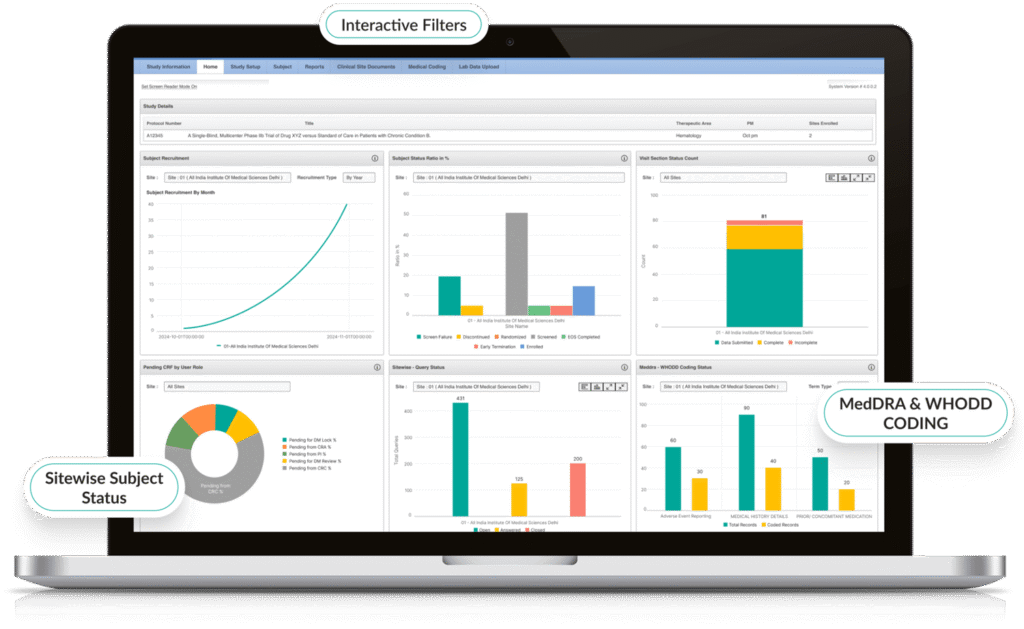
Document Control

Create, review, approve, distribute, revise, and retire SOPs, policies, manuals, forms, and work instructions.

Automated Workflows

Route tasks to the right owners with due dates, approvals, reminders, escalations, and complete audit trails.

Secure Compliance Records

Protect quality records with role-based access, electronic approvals, traceability, and controlled retention.

CAPA Management

Investigate issues, document root cause, assign actions, track completion, and verify effectiveness.

Audit Management

Plan audits, build checklists, capture findings, assign corrective actions, and generate clear reports.

Risk Management

Identify, score, mitigate, and monitor quality risks across processes, suppliers, products, and sites.

Real-Time Dashboards

Track overdue training, CAPA status, audit findings, supplier issues, risk trends, and quality metrics.

Supplier Quality

Manage qualification, evaluation, audits, certifications, performance, findings, and supplier CAPA.

Change Control

Assess impact, review risks, approve implementation, track tasks, and verify controlled completion.

Scheduling and Visit Tracking

Manages schedules for trial-related activities, including participant visits, monitoring visits, and key milestones.

Customer Experience

A better quality experience for every team

The platform adapts to the work each group needs to complete, while giving leadership a connected view of the quality system.

QA Managers

Connect the people, processes, records, and decisions that keep your quality system moving.

Compliance Teams

Maintain audit-ready records with approvals, version history, access controls, and traceable decision logs.

Employees

Complete assigned training, acknowledge revised documents, and follow the latest approved procedures.

Leadership

Review quality performance, recurring risks, open actions, supplier trends, and improvement priorities.

eQMS Modules

Explore each quality module in detail

Use the module explorer to understand how each process works and how the system keeps records controlled from start to finish.

Document Control

Manage the full lifecycle of SOPs, policies, work instructions, manuals, forms, and templates through controlled creation, review, approval, release, revision, and retirement.

Best for

SOPs

Controlled document governance, revision visibility, and employee acknowledgment.

Training Management

Ensure employees are trained on relevant procedures, policies, and job responsibilities with automatic assignments, due dates, assessments, and competency tracking.

Best for

92%

Training completion visibility across roles, sites, and controlled documents.

CAPA Management

Manage corrective and preventive actions from issue intake through investigation, root cause, action planning, approval, execution, and effectiveness verification.

Best for

CAPA

Structured resolution for deviations, complaints, audits, and recurring quality events.

Nonconformance Management

Record and manage products, processes, materials, or services that do not meet defined requirements, then assess impact and decide disposition.

Best for

NCR

Better control over defects, rejected materials, and process failures.

Change Control

Manage changes to products, processes, equipment, systems, documents, suppliers, or specifications through structured impact assessment and approval.

Best for

Impact

Controlled decisions for process, product, system, and supplier changes.

Audit Management

Plan, schedule, conduct, report, and close internal audits, supplier audits, customer audits, and regulatory audit preparation activities.

Best for

Audits

A single view of audit schedules, findings, actions, and closure status.

Risk Management

Identify, assess, mitigate, and monitor quality risks across the organization using risk scoring, controls, reviews, and linked quality records.

Best for

Risk

Risk-based thinking connected to everyday quality operations.

Complaint Management

Capture, classify, investigate, and resolve customer complaints while identifying trends and escalating quality concerns when needed.

Best for

CX

Better complaint handling and stronger customer quality insight.

Supplier Quality Management

Manage supplier qualification, approvals, evaluations, audits, certifications, performance monitoring, nonconformances, and supplier corrective actions.

Best for

SQM

Supplier quality oversight from qualification to performance review.

Deviation Management

Record, investigate, approve, and close planned or unplanned departures from approved procedures, processes, specifications, or quality standards.

Best for

DEV

Controlled documentation for process and procedure departures.

Equipment and Calibration Management

Manage equipment records, maintenance schedules, calibration plans, service history, due dates, and compliance evidence in one controlled module.

Best for

Assets

Reliable equipment status, calibration readiness, and maintenance traceability.

Management Review

Help leadership review quality system performance through structured agendas, metrics, risks, audit results, CAPA trends, complaints, and improvement actions.

Best for

Review

Leadership visibility into quality system health and improvement priorities.

Quality Workflow

Turn quality events into accountable improvement

A structured workflow helps teams respond faster to deviations, audit findings, complaints, supplier issues, and nonconformances.

Identify Issue

Capture the event, source, severity, affected process, and immediate containment needs.
Investigate

Review evidence, document root cause, assess impact, and decide whether CAPA is required.
Approve Actions

Route corrective and preventive actions for review, approval, ownership, and due dates.

Track Progress

Monitor completion, overdue work, escalations, evidence, and linked quality records.
Verify Effectiveness

Confirm actions solved the issue and document results for inspection-ready closure.

Build a quality system that works smarter

Digitize quality processes, improve compliance, and keep your teams audit-ready with a connected eQMS platform.

FAQ

Frequently asked questions

Clear answers for teams evaluating an electronic quality management system.
What is an eQMS?
An eQMS, or Electronic Quality Management System, is software used to manage quality processes, compliance records, documents, training, audits, CAPA, risk, suppliers, complaints, and other quality activities digitally.
An eQMS is useful for regulated and quality-focused industries such as pharmaceuticals, medical devices, biotechnology, manufacturing, food and beverage, cosmetics, laboratories, and healthcare.
It standardizes workflows, maintains controlled records, tracks approvals, improves traceability, protects document versions, and keeps records organized for audits and inspections.
Yes. An eQMS can digitize documents, forms, approvals, records, reports, training assignments, investigations, and quality workflows that are often managed manually.
Yes. When a document is released or revised, training can be assigned automatically to the right employees, roles, departments, or sites.
Yes. It supports audit planning, checklists, finding management, corrective actions, evidence collection, reports, and inspection-ready quality records.